Don't Know What to Offer as Your Freebie? These 5 Lead Magnet Ideas Actually Get Opt-Ins
You know you need a lead magnet. You've heard it a hundred times. "Build your list." "Offer something free." "Give people a reason to opt in."
But then you sit down to actually figure out what that thing is and nothing happens. You open a blank Canva doc, stare at it, close it, and go do something else.
I get it. There's so much advice out there about lead magnets that it somehow makes it harder to just pick one and make it. Most examples you see online are built by people with massive audiences, big teams, or way too much time. That's not where most of us are starting from.
So today I'm cutting through all of it.
I'm going to show you what actually makes a lead magnet convert, give you 5 specific types that work really well for introverted entrepreneurs, and help you figure out which one to make so you can stop overthinking and actually finish it.
Because here's the thing. Your lead magnet is the front door of your entire funnel. Get this right and everything else your email list, your welcome sequence, your sales starts working the way it's supposed to.
What Actually Makes a Lead Magnet Convert
Before we get into the ideas, let's talk about why most lead magnets don't work. Because it's usually not what people think.
It has to solve one specific problem.
The biggest mistake I see is making a lead magnet too broad. "Free guide to starting an online business" sounds helpful but it doesn't make anyone click. "The exact pricing script introverted coaches use to close clients without feeling pushy" now that's something people opt in for.
Specific beats comprehensive every time. The more clearly your reader sees themselves in the title, the more they sign up. Simple as that.
It has to be fast to consume.
People are already overwhelmed. They're not looking for more homework. They want a quick win something they can actually use today, not something they'll save to a folder and never open.
The best lead magnets can be read, completed, or used in under 20 minutes. Long doesn't mean valuable. Clear means valuable.
It has to lead somewhere.
This one is huge and most people miss it completely.
Your lead magnet is not the final destination. It's the bridge between a stranger finding you and that same person becoming a paying customer. If there's no logical connection between your freebie and what you actually sell, you'll end up with a list full of people who never buy anything.
Every lead magnet should solve one problem and naturally make the reader want the next step which is your paid offer.
Who This Post Is For
Real quick this is written for you if:
You're a solopreneur, coach, course creator, or digital product seller
You want to grow an email list without posting on social media every day
You've been putting off creating a lead magnet because you don't know where to start
You want something simple enough to actually finish this week
And here's what you don't need to make this work: a big audience, a fancy design tool, weeks of prep time, or any complicated tech. Canva free and a basic email platform is all you need.
5 Lead Magnet Ideas That Actually Get Opt-Ins

Image by Upklyak on Freepik.com
These five types consistently outperform everything else for solopreneurs and small online businesses. Each one is beginner-friendly, fast to create, and built to attract the right subscribers not just anyone.
1. The Worksheet
A worksheet is a fillable or printable document that walks your reader through a specific process step by step. Think guided prompts, fillable sections, a clear flow from start to finish.
Worksheets convert really well because they feel immediately useful. The reader isn't just getting information they're getting a tool. Something they can open and actually work through today.
And for introverted entrepreneurs, this is a great option because you create it once in Canva and it delivers itself automatically. No live calls, no ongoing effort, no showing up.
What to put inside:
A title that names the specific outcome clearly
Simple instructions at the top 2 or 3 sentences, no more
Fillable sections with prompts, not just blank lines
A logical flow where each section builds on the one before it
A "next step" at the bottom pointing toward your offer or a related blog post
If you want to see a real example of this in action, the Pricing Confidence Worksheet is exactly this format. Six pages, about 20 minutes to complete, and by the end the reader has an actual price they can stand behind.
Title formulas that work:
"The [Topic] Worksheet for [Audience]"
"The [Outcome] Exercise: A Step-by-Step Worksheet for [Who]"
2. The Checklist
A checklist is exactly what it sounds like a simple, scannable list of steps or actions your reader needs to complete a task or avoid a mistake.
People love checklists because they're fast. Low commitment to download, immediately useful, easy to work through. The brain genuinely loves a list it can check off.
This is also one of the fastest lead magnets to build. You can honestly finish a checklist in an afternoon if you sit down and focus.
What to put inside:
A title that names the exact task or outcome
10 to 20 items max, more than that and it starts to feel overwhelming
Brief one-line descriptions under each item if they need context
Organized into 2 or 3 sections so it's easy to scan
A CTA at the bottom
Some ideas that would work well for your audience:
"The Introvert's Business Launch Checklist: Everything You Need Before You Go Live"
"The Quiet Funnel Checklist: 10 Things Your Sales System Needs to Run on Autopilot"
"The Weekly Business Audit Checklist for Solopreneurs Who Want to Work Less"
Keep it to one page. Two pages max. Clean fonts, white space, actual checkbox icons so people can print it and physically check things off.
3. The Swipe File or Template
This one is seriously underused and it converts incredibly well.
A swipe file or template is a ready-to-use document your reader can copy, customize, and use right away. Email scripts, caption templates, pitch emails, sales page copy, content calendars anything that removes the blank page problem for them.
Instead of teaching someone how to do something, you're handing them the done-for-you version. That's extremely high perceived value for something you're giving away free.
And it doesn't require you to show your face, record anything, or be "on" in any way. The work speaks for itself.
What to put inside:
The actual template, not a guide about how to make one
Brief instructions on how to customize it
2 or 3 real examples of the template in use
Notes on what to change vs. what to keep as-is
Ideas that would land well for your audience:
"The Introvert's Email Welcome Sequence Template: 7 Done-for-You Emails"
"5 Pinterest Pin Descriptions That Drive Traffic to Your Blog (Copy and Paste)"
"The Cold Pitch Email Template That Books Clients Without Feeling Pushy"
Quick tip: Canva works great for visual templates, but Google Docs is actually better for text-heavy ones. Easier for your reader to copy and edit.
4. The Mini Guide or Quick-Start Guide
A mini guide is a short, focused PDF usually 5 to 15 pages that walks your reader through one specific topic from start to finish. This is not a full e-book. It's not trying to cover everything. It covers one thing really well.
The "quick start" framing matters. It tells your reader they're going to get a result fast. And that's exactly what they're looking for when they opt in to something.
This one works especially well if you have a process or framework to teach. You're walking them through it step by step in a way that feels doable.
What to put inside:
An intro that speaks to the reader's problem directly 2 or 3 paragraphs, not 10
3 to 5 clear sections, each covering one step or concept
Short paragraphs, this is a guide not a textbook
Simple visuals or graphics if they help
A final section that bridges naturally to your paid offer
Ideas that would work well:
"The Quiet Business Quick-Start Guide: How to Set Up a Passive Income System in 7 Days"
"Pinterest for Introverts: A Beginner's Guide to Getting Traffic Without Social Media"
"From Zero to First Sale: The Introvert's Guide to Launching a Digital Product"
Canva's document or presentation templates are perfect for this. Aim for 8 to 12 pages enough to feel valuable, short enough to actually get read.
5. The Free Email Course
This is the most underused lead magnet on this list and honestly one of the best ones you can build.
A free email course is a series of 3 to 5 emails, delivered automatically over a few days, each one teaching a single lesson on your topic. The reader opts in, and instead of getting a PDF, they get a lesson in their inbox every day for a week.
Here's why this works so well: by the time someone finishes your free email course, they already feel like they know you. They've opened your emails multiple times. They've gotten real value from you multiple times. Trust builds fast when that happens, way faster than a single PDF download.
It's also one of the best things you can do for your email deliverability. When subscribers open your emails from day one, it signals to email providers that they actually want your content. That protects you long term.
And once you write it, it runs forever. Every single person who joins your list goes through the exact same experience automatically. You do the work once.
A simple structure that works:
Day 1: The core problem and why most people stay stuck
Day 2: The first mindset or strategy shift they need
Day 3: A specific action step they can take today
Day 4 (optional): A case study or real example
Day 5 (optional): The natural bridge to your paid offer
Ideas for your audience:
"The 5-Day Quiet Business Starter Course: Build Your First Passive Income Stream Without Social Media"
"5 Days to Your First Digital Product: A Free Email Course for Introverted Entrepreneurs"
"The Introvert's Pricing Mini Course: 5 Lessons to Help You Charge What You're Worth"
If you want to see how the emails inside a sequence like this should actually sound, read The 7-Email Welcome Sequence post here the principles are the same.
How to Pick the Right One for You
Five options can feel like too many choices. So here's a simple way to decide.
Match it to your offer.
Your lead magnet and your paid offer should solve problems that sit right next to each other. The freebie solves the first problem. The paid offer solves the next one.
Worksheet pairs well with a low-ticket digital product or course
Email course pairs well with a higher-ticket course or coaching program
Template pairs well with a done-for-you service or template shop
Checklist pairs well with a quick-win product or membership
Mini guide pairs well with a course or coaching program
Match it to where your reader is.
Brand new to your topic? Start with a checklist or quick-start guide. They need orientation first.
Already know the basics and need help executing? A worksheet or template will convert better.
Warm and close to buying? An email course that flows directly into your offer is the move.
Match it to your actual timeline.
Have one afternoon? Build a checklist. Have a weekend? Build a worksheet or swipe file. Have a full week? Build a mini guide or email course.
Work with where you actually are, not where you wish you were.
How to Deliver It (The Simple Tech Setup)

Image on Magnific.com
Create it.
Use Canva for visual PDFs, worksheets, checklists, mini guides. Use Google Docs for text-heavy swipe files or templates. For an email course, you don't need a separate tool, write the emails directly inside your email platform.
Host it.
Upload your PDF to Google Drive, Dropbox, or directly inside your email platform. Always deliver via link, never as an email attachment. Attachments trigger spam filters and your email won't land.
Automate the delivery.
Connect your opt-in form to your email platform. Set up one simple automation: someone opts in, they instantly receive an email with the download link. Done. Your welcome sequence takes over from there.
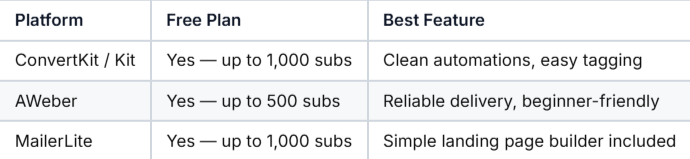
Here are three solid platforms to get you started:
Drive traffic to it.
Write a blog post on the same topic and offer your lead magnet inside it as a bonus download. Create a Pinterest graphic that links to your opt-in landing page. Add a CTA to your lead magnet in every related blog post you publish.
You don't need to do all of this at once. Pick one traffic source, get it working, then layer in the next.
Final Thoughts
Here's what I want you to take from this post.
The best lead magnet is the one you actually finish and put out into the world. Not the perfect one sitting in your drafts. Not the one you've been planning for three months. The one that's done and live and working for you right now.
Pick one of these five. Give yourself a deadline. Build it.
Once it's live, it starts doing the work for you, growing your list, warming up subscribers, and setting up your sales, while you're focused on everything else.
That's the whole point.
If you want to see what a finished lead magnet looks like, grab the free Pricing Confidence Worksheet here. It's a real example built for introverted entrepreneurs who are tired of undercharging, and it'll show you exactly what's possible with one simple document. Plus you will receive a Canva lead magnet template to help you create your lead magnet.
And if you want to understand how your lead magnet fits into the bigger picture of your sales system, read The Introvert's Invisible Sales Funnel next. It shows you exactly where your freebie lives inside a funnel that sells for you around the clock.
Want more strategies for building a quiet, profitable business without burning out? Browse the Residual Money Train blog for more.